Best Digital Locks for Airbnb Hosts: Secure, Easy Access Solutions
Smart, reliable access is essential for smooth Airbnb hosting. This guide highlights five top digital lock options and a smart lock box that cater to short-term rentals, focusing on easy installation, flexible guest management, and dependable security. Each product delivers a distinct balance of convenience and control, from offline access for quick check-ins to Wi‑Fi connected systems for remote monitoring. Use the buying guide below to compare access methods, installation needs, and maintenance to choose the right mix for your property portfolio. The quick-reference table after this introduction helps you scan core strengths at a glance.

Sifely Biometric Smart Lock With Keypad
Sifely’s Keyless Entry Fingerprint Smart Lock with Handle & Keypad blends biometric security with flexible access for Airbnb hosts. It supports six unlock options: fingerprint, passcode, wireless key fob, card, smartphone, and a traditional key, delivering redundancy for guests and property managers. A notable feature is the ability to generate a passcode remotely without an internet connection, streamlining guest check-ins even in offline environments. Installation is straightforward—no locksmith needed—and the door handle is reversible, accommodating both left- and right-handed doors. Battery life reaches up to a year on four AA batteries, reducing maintenance trips.
Designed for high-traffic rentals, this model suits front, interior, exterior, and bedroom doors. It enables temporary guest codes and remote passcode distribution, minimizing key handoffs and enhancing security. The 3D fingerprint sensor unlocks quickly, enhancing guest experience while maintaining strong access control. The 6‑in‑1 system offers a centralized way to manage guest entries, and the hardware construction supports durability against daily wear. Overall, Sifely combines speed, versatility, and install-ability, making it a practical option for property managers seeking convenient, secure access for multiple listings.
Schlage Encode Smart WiFi Deadbolt

Schlage Encode Smart WiFi Deadbolt brings modern access control to Airbnb properties with built-in WiFi that connects directly to your home network. Guests can enter using codes, via the app, or through voice assistants once linked to a compatible ecosystem. The lock can support up to 100 access codes, enabling one-time or scheduled entries without sharing physical keys. Lock history and customizable notifications help hosts monitor activity, while compatibility with Alexa and Google Home offers hands-free convenience for both hosts and guests.
Setup requires a stable WiFi connection and the Schlage Home app. This model is well suited for hosts who need remote monitoring and centralized control across multiple properties. You can manage guest codes, track entry events, and receive alerts, all from a single interface. The system supports time-bound access for visitors, which is particularly valuable for cleaners and repair visits. For properties with reliable internet, Schlage Encode provides scalable, convenient guest management and enhanced security visibility.
Kucacci Keypad Smart Door Lock

Kucacci’s Keypad Smart Door Lock with Handle offers a 5‑in‑1 unlocking suite: fingerprint, passcode, app, key fob, and key, with optional WiFi control via a gateway. This versatility supports diverse guest needs and provides a reliable fallback if one method is unavailable. Installation is a DIY affair, typically completed in about 10 minutes without drilling, and it fits standard door thicknesses. The accompanying app centralizes administration—admins can create codes, share e-keys, and monitor unlock activity—making it a strong option for Airbnb hosts who manage multiple listings from a single device.
The lock is designed for straightforward, scalable management, which is ideal for properties with varying guest profiles. It supports easy admin control, guest provisioning, and activity logs, helping hosts maintain security without sacrificing guest convenience. With reliable compatibility for common backsets and door dimensions, Kucacci presents a practical, user-friendly solution for rental properties that require flexible access control and simple installation.
Yamiry Fingerprint Smart Door Lock

Yamiry’s Fingerprint Smart Door Lock delivers a robust 6‑in‑1 unlocking experience, including fingerprint, Bluetooth app control, personalized passcodes, key fobs, mechanical keys, and Alexa voice unlock (requires a separately sold WiFi gateway). This broad mix satisfies different guest preferences while maintaining strong security controls. Installation is quick—about 10 minutes—and the reversible handle supports both left and right-handed doors, making it suitable for most standard American wooden front doors. The app provides permanent and temporary access management, enabling remote unlock and detailed activity logs for hosts monitoring guest activity.
For hosts seeking flexible, app-driven access along with voice-assisted entry, Yamiry combines multiple entry methods with straightforward installation. The requirement of a WiFi gateway for Alexa is an important consideration for property managers who want smart assistants integrated into their hosting setup. Overall, Yamiry offers a versatile, user-friendly option that balances convenience for guests with clear administrative control for hosts.
Master Lock Digital Lock Box for Keys
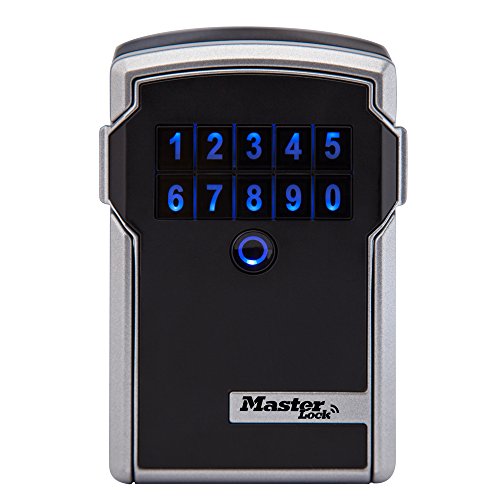
The Master Lock 5441EC Digital Lock Box offers secure storage for keys and access cards with Bluetooth-enabled app support and sharable keypad codes. This solution is ideal for unattended properties or when you need to provide guest access without altering door hardware. It supports temporary or permanent access for invited guests, with time-based or code-based permissions managed via the Master Lock app. The unit is weather resistant and designed for indoor or outdoor use, providing a robust storage option for spare keys or access credentials across Airbnb or VRBO listings.
Key advantages include a large internal cavity for multiple keys, a weather-protected shutter for the keypad, and tamper alerts or low-battery notifications. No Wi-Fi is required for operation, which can be a benefit in areas with unreliable internet. For hosts who want a reliable, low-maintenance way to distribute access credentials without touching the main door hardware, this lock box offers a practical, durable solution with straightforward management capabilities.
Buying Guide
Key Considerations When Choosing Digital Locks for Airbnb
- Access needs: Decide between door locks (for primary entry) and lock boxes (for spare keys or secondary access). Some hosts combine both for maximum flexibility.
- Access methods: Look for multi‑modal options (fingerprint, passcodes, app control, and physical keys) to accommodate guests with different tech preferences.
- Guest management: Prioritize systems that support time-limited or one-time codes, access logs, and easy revocation to maintain security between bookings.
- Installation and compatibility: Verify door thickness, backset, and whether the installation requires drilling or professional help. DIY-friendly models save time and costs for single properties.
- Connectivity: WiFi-enabled locks provide remote monitoring but rely on internet stability. Bluetooth or offline modes can be more reliable in some markets.
- Battery life and maintenance: Consider battery reliability and replacement frequency. A longer battery life reduces on-site maintenance visits between guests.
- Security features: Research tamper alerts, encryption standards, and build quality. Durable materials and tamper resistance protect both guests and hosts.
- Integration with existing tools: If you use smart home ecosystems or property management software, choose locks that integrate with your setup for streamlined operations.
- Reliability and support: Look for brands with solid warranties and accessible customer support, especially for multiple listings.
Lock Types Versus Hosting Scenarios
- Single-property hosts: DIY-install, offline-capable or WiFi-enabled locks can simplify guest check-ins and reduce on-site visits.
- Multi-listing portfolios: Cloud-based management and centralized access control help maintain consistency and oversight across properties.
- High turnover or complex access needs: Locks offering multiple unlock methods and detailed activity logs offer the most flexibility and security.
Door Lock Versus Lock Box: Which To Choose?
- Door locks: Best for primary entry security and guest convenience; look for ease of use, reliable connectivity, and scalable guest code management.
- Lock boxes: Ideal for spare keys, maintenance visits, and emergency access; ensure weather resistance, sufficient capacity, and straightforward code sharing.
Durability, Privacy, and Maintenance
- Durability: Choose weatherproof and tamper-resistant designs for outdoor or exposed locations.
- Privacy: Ensure codes and access logs are securely stored and accessible only to authorized users.
- Maintenance: Plan for battery replacement and firmware updates to keep devices functioning smoothly between bookings.
Pricing and Scale
- Budget: Basic keypad or offline models are typically less expensive, while WiFi-enabled and high‑security options cost more but offer expanded control and convenience.
- Scale: For multiple listings, prioritize cloud-managed systems and easy guest provisioning to reduce administrative overhead.
In summary, the best choice depends on your hosting model, property count, and guest flow. If you need true remote monitoring and broad guest-management capabilities, a WiFi-enabled lock like the Schlage Encode may fit best. For offline resilience and quick check-ins, a fingerprint-based system such as Sifely offers speed and versatility. For spare-key access, a durable lock box from Master Lock provides a simple, reliable alternative or supplement. Finally, ensure installation compatibility with your doors and consider a mix of door locks and lock boxes to cover every hosting scenario.