Best Non-WiFi Programmable Thermostats for Reliable Home Comfort
Programmable thermostats offer convenient climate control and energy savings without constant manual adjustments. This guide reviews five well-regarded models from Honeywell, Google, ecobee, and Emerson to help you choose a dependable option for your home, even if you prefer a non-connected setup. Each model provides seven-day scheduling and straightforward installation, with variations in display, manual controls, and smart features. Use the buying guide below to compare compatibility, installation needs, and potential energy savings. A quick summary table at the top of this section gives an at-a-glance view to kick off your evaluation.
| Product | Brand | Notable Feature |
|---|---|---|
| Honeywell Home RTH8560D 7 Day Programmable Touchscreen Thermostat | Honeywell Home | 7-day programming with a clear touchscreen display |
| Honeywell Home RTH6580WF Wi-Fi 7-Day Programmable Thermostat | Honeywell Home | Wi-Fi enabled with easy app control |
| Google Nest Thermostat | Energy savings features and compatibility with multiple assistants | |
| ecobee Smart Thermostat Essential | ecobee | Energy Star certified with broad smart-home compatibility |
| Sensi Smart Thermostat ST55 | Emerson | Privacy protections and easy DIY installation |
Honeywell Home RTH8560D 7 Day Programmable Touchscreen Thermostat

The RTH8560D offers straightforward seven-day programming with a large, backlit touchscreen display for easy adjustments. Its design emphasizes simple, reliable control over heating and cooling cycles, making it a solid choice for users who want a traditional, non-networked setup. The provided details indicate easy scheduling for daily, weekend, or an entire week pattern, which helps align climate control with varying routines. In practice, the model delivers dependable performance without requiring constant internet access or third-party apps, while still fitting into homes that prefer physical controls on the device itself.
Installation is typically straightforward for a DIYer, with standard wiring and a clear display that makes wiring decisions easier. The product listing mentions that the package includes both the thermostat and a receiver, underscoring its classic, self-contained approach. While the interface may not feature modern app integration, the emphasis on a crystal-clear, blue-backlit display supports quick temperature checks and simple manual adjustments. This model remains a reliable, no-frills option for households prioritizing tactile control and predictable, weekly programming.
From an energy-management perspective, the seven-day scheduling capability lets you tailor heating and cooling to your routine, potentially reducing wasted energy. The user experience centers on readability and ease of use, with a focus on a straightforward setup rather than ongoing connectivity. If you desire remote access or voice-integrated features, you may prefer a Wi-Fi-enabled alternative; however, for those who value hands-on control and minimal network reliance, the RTH8560D continues to offer solid performance and clear value.
Honeywell Home RTH6580WF Wi-Fi 7-Day Programmable Thermostat

The RTH6580WF combines classic seven-day programming with Wi-Fi connectivity, enabling control via the Total Connect Comfort app or Honeywell Home app. This model provides convenient remote access, which is helpful for adjusting comfort settings while away from home. It supports voice assistant integration through compatible ecosystems and offers a straightforward install process for do-it-yourself enthusiasts who want modern conveniences without a complex setup. The app-based control can help optimize energy use by letting you tweak schedules remotely or respond to changes in daily routines in real time.
In terms of features, the Wi-Fi-enabled design focuses on ease of use and quick setup, making it a practical upgrade for older, non-smart systems that still benefit from digital scheduling. It remains compatible with standard 24V HVAC units, and its seven-day program can help you lock in consistent comfort while looking to reduce seasonal energy waste. For homeowners who want a balance of hands-on control and remote monitoring, this Honeywell model provides a solid middle ground between traditional thermostats and fully connected systems.
One consideration with Wi‑Fi models is the reliance on a network connection for full functionality. If your internet access is unstable, you might experience occasional delays or require manual adjustments. However, the option to control temperature from a mobile app adds flexibility for busy households, vacation planning, or just the convenience of adjusting settings from a sofa or bed. Overall, the RTH6580WF offers reliable scheduling with modern connectivity, making it a widely compatible upgrade for many homes seeking enhanced control without sacrificing familiar programming features.
Google Nest Thermostat
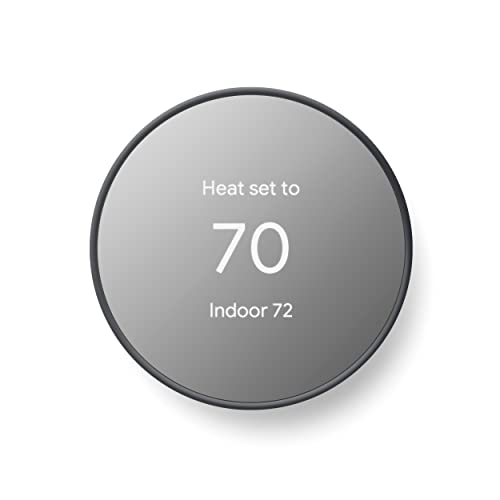
The Nest Thermostat is designed to optimize energy use while delivering a strong focus on ease of use and compatibility with a range of smart home systems. It is ENERGY STAR certified, and it supports both 2.4 GHz and 5 GHz Wi‑Fi for reliable connections. Nest emphasizes intelligent energy-saving behaviors, such as turning itself down when you’re away to prevent heating or cooling an empty home. Compatibility is broad, and the Nest ecosystem offers compatibility checkers to confirm system readiness, along with notes about whether a C wire or alternative power accessory is needed for certain setups.
Users appreciate the Nest’s ability to learn occupancy patterns and adjust settings accordingly, which can contribute to long-term energy savings beyond manual scheduling. The thermostat’s design also focuses on a clean, minimal interface, where the display and controls feel intuitive while integrating with Google Assistant, Alexa, or other smart home services where applicable. A note on installation: in many homes, the Nest can operate without a C wire, but some configurations—such as heating-only, cooling-only, or zone-controlled systems—may require a dedicated power source. This balance of ease of installation, energy-conscious design, and smart-home compatibility makes the Nest a popular option for many households seeking a connected but approachable thermostat experience.
ecobee Smart Thermostat Essential

The ecobee Smart Thermostat Essential emphasizes energy efficiency and broad smart-home compatibility. It is ENERGY STAR certified and claims potential savings of up to 23% on heating and cooling costs by adapting to your schedule and occupancy. The thermostat’s touchscreen interface supports easy temperature changes and navigation, while ecobee’s software updates help ensure you get ongoing improvements without replacing hardware. It’s designed to work with Siri, Alexa, and Google Assistant, enabling voice control and easy integration into existing smart ecosystems. ecobee also highlights compatibility with a wide range of HVAC systems, with an online compatibility checker to reduce the risk of mismatch during purchase.
In practice, the Essential combines a modern color touchscreen with reliable, cloud-assisted features that enhance energy management without being as reliant on constant online access as some newer models. The emphasis on compatibility with many systems means a broader range of homes can benefit from programmable scheduling, remote access, and usage analytics. For households seeking a balance between smart features and straightforward operation, ecobee’s offering presents a compelling option that preserves classic programmable capabilities while delivering modern convenience.
Prospective buyers should consider whether they want ongoing software updates and smart features or a simpler, more traditional experience. For those who value privacy and data protection, ecobee provides solid controls along with clear energy-tracking capabilities. If you prioritize full Alexa or Google Assistant integration, this model complements other smart devices well, but you may also want to verify whether you prefer a device that relies more on manual programming than cloud services for routine adjustments.
Sensi Smart Thermostat ST55
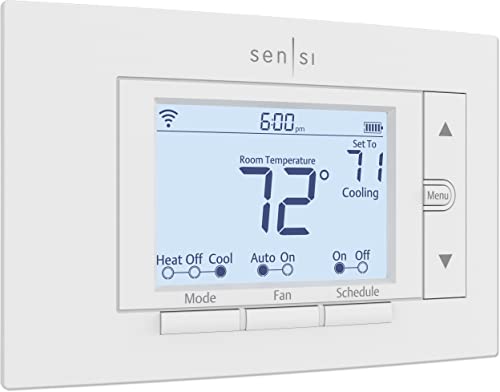
The Sensi ST55 emphasizes privacy and straightforward installation. It features easy DIY installation with a built-in level and app-guided instructions, making it accessible for homeowners who want a reliable programmable thermostat without complex wiring. The thermostat is ENERGY STAR certified and designed to work with a wide range of HVAC equipment; it supports remote access and provides usage reports to help you monitor energy consumption. A notable benefit is that a common wire (c-wire) is not required in most applications, simplifying setup for many homes. Sensi prioritizes user privacy and keeps data collection minimal compared to some cloud-first alternatives.
In terms of energy savings, Sensi advertises around 23% potential reduction when used with flexible scheduling and remote access features. The ST55’s design focuses on a clean, simple experience, with compatibility to work across different platforms and voice assistants like Alexa. For homeowners who want a budget-friendly, easy install with reliable scheduling and privacy protections, Sensi offers a practical combination of value and performance. If you anticipate needing extensive smart-home integration, you may weigh how Sensi fits within a broader automation strategy versus models with broader ecosystem support.
Buying Guide
: Check whether your system uses a standard 24V thermostat control and if it requires a C-wire for power. Some newer Wi-Fi models can operate on limited power or with adapters, but most legacy homes rely on a traditional wiring setup. Use the manufacturer’s compatibility checker to confirm suitability with heat pumps, gas furnaces, or air conditioners. : DIY installation is common for many programmable thermostats, yet some models may require more wiring or professional help. If you’re replacing an older thermostat, identify existing wires, especially the C-wire, G (fan), Y (cool), and W (heat) connections to ensure compatibility. : Wi‑Fi-enabled models offer remote control and smart features but raise privacy considerations and dependence on your network. Non-Wi‑Fi designs emphasize local control and reduced data exposure, which can be preferable for privacy-conscious users or areas with unreliable internet. : Most modern programmable thermostats advertise energy savings by optimizing schedules and occupancy-based adjustments. Look for ENERGY STAR certification and features such as adaptive scheduling, hold/reminder options, and energy reports to quantify expected savings over time. : If you use voice assistants (Alexa, Google Assistant, Siri), check compatibility. Some thermostats pair seamlessly with multiple ecosystems, while others may be more limited. Consider whether you want geofencing, occupancy detection, or energy rebates offered through your utility provider. : A clear, legible display (backlit touchscreen or analog interface) makes daily adjustments easier. Some users prefer tactile, physical controls, while others value a color touchscreen and app-driven convenience. Ensure the user interface aligns with your comfort level and daily routine. : Wi‑Fi thermostats rely on software updates for improvements, which can be beneficial but may introduce changes you don’t want. Non-Wi‑Fi units focus on stable, hardware-based operation and fewer ongoing changes, which some users find preferable for long-term reliability. : Compare upfront cost, warranty coverage, and potential return policies. Energy savings redirects may offset cost over time, but overall value depends on your system and usage patterns. : If data privacy is a priority, review how data is used, stored, and shared by the manufacturer. Some brands emphasize customer data protection and opt-out options for data sharing in the app settings. : Look for features such as simple firmware updates, readily available replacement parts, and robust customer support for troubleshooting and replacements if needed.