Best RGB Radiator Fans for PC Cooling
As PC builders seek vibrant, efficient cooling, RGB radiator fans blend lighting with performance. The five selections here balance aesthetics, noise, and airflow for radiators and chassis alike, across a range of builds. Use the quick overview table below to compare core specs at a glance and then dive into detailed sections for each option.
| Product | Brand | Notable RGB Feature |
|---|---|---|
| Thermaltake CT120 EX ARGB 3-Fan Pack | Thermaltake | MagForce magnetic connection for daisy-chaining and 9 addressable LEDs |
| Thermaltake TOUGHFAN 12 RGB Radiator Fan 3 Pack | Thermaltake | 16.8M RGB with 24 LEDs and diffusible frame |
| CORSAIR iCUE Link LX120 RGB 120mm PWM Fans Triple Pack | Corsair | Dual Light Loops, iCUE Link hub |
| Corsair RS120-R ARGB 120mm PWM ARGB Reverse Fans – Triple Pack | Corsair | Reverse rotor lighting visibility with eight LEDs per fan |
| NZXT Kraken Elite 360 RGB 2025 | NZXT | 2.72″ IPS LCD pump display with RGB ring sync |
Thermaltake CT120 EX ARGB 3-Fan Pack

The CT120 EX ARGB 3-Fan Pack uses MagForce 2.0 magnetic connections for easy daisy-chaining, linking multiple fans with a single cable. It features 9 addressable LEDs controlled by 5V motherboard sync software for cohesive illumination across radiators and cases. The compact 120 mm form fits most water-cooling setups and chassis front mounts.
- MagForce 2.0 magnetic connection for daisy-chaining
- Single-cable daisy chain for multiple fans
- 9 addressable RGB LEDs via 5V motherboard control
Thermaltake TOUGHFAN 12 RGB Radiator Fan 3 Pack
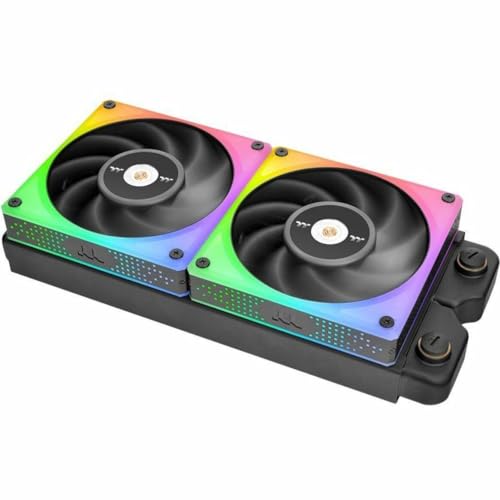
TOUGHFAN 12 RGB fans pair rugged performance with vibrant lighting. They deliver up to 53.75 CFM of airflow and 2.4 mm-H2O static pressure for radiator efficiency, while maintaining quiet operation. The diffusible frame showcases 16.8 million RGB LEDs across 24 lights, and PWM control enables speeds up to 2000 RPM for demanding cooling tasks.
- Max Air Flow: 53.75 CFM
- Static Pressure: 2.4 mm-H2O
- 16.8M RGB LEDs with 24 lights
- PWM control up to 2000 RPM
CORSAIR iCUE Link LX120 RGB 120mm PWM Fans Triple Pack

These LX RGB fans feature dual light loops with 18 LEDs per fan for vibrant, synchronized lighting across iCUE devices. They deliver precise PWM speeds up to 2,400 RPM and 69.9 CFM, with 5.22 mmH2O static pressure for strong radiator performance. The included iCUE Link bridge connects all fans to a single hub, simplifying cable management.
- 18 LEDs per fan across dual loops
- PWM speeds up to 2400 RPM; 69.9 CFM
- 5.22 mmH2O static pressure
- iCUE Link bridge for single-cable control
Corsair RS120-R ARGB 120mm PWM ARGB Reverse Fans – Triple Pack

RS120-R fans use a reverse rotor design to maximize ARGB lighting visibility when mounted as intakes. Each fan includes eight ARGB LEDs for bright, customizable lighting controlled through compatible motherboard software. They combine strong airflow with high static pressure, making them well-suited for radiators and sealed loops.
- Reverse rotor for enhanced lighting visibility
- Eight LEDs per fan
- ARGB control via motherboard software
- Daisy-chain compatibility
NZXT Kraken Elite 360 RGB 2025

NZXT’s Kraken Elite 360 RGB combines a high-performance 360 mm radiator with a Turbine pump for efficient cooling. It features a large 2.72-inch IPS LCD pump display with 640 x 640 resolution, 60 Hz, and up to 690 cd/m² brightness. The RGB ring can sync with on-screen content and other RGB devices for a cohesive build aesthetic, while maintaining strong cooling under load.
- 360 mm radiator with Turbine pump
- 2.72″ IPS LCD display on the pump
- RGB ring sync with content and devices
- High-brightness display for vivid visuals
Buying Guide
Key factors to consider
Choosing RGB radiator fans involves balancing lighting, cooling performance, and ecosystem compatibility. Start with radiator size and case clearance to ensure the fans fit your build. If you plan to sync lighting across components, check your motherboard or cooler ecosystem (iCUE, Aura Sync, RGB Fusion, NZXT CAM) and pick fans that integrate smoothly.
- Radiator size and mounting compatibility (120/140/240/360 mm)
- Static pressure vs airflow depends on radiator density and fin design
- PWM control for precise, quiet operation at low speeds
- RGB ecosystem compatibility and software control
- Power and fan hub availability; daisy-chaining capabilities
- Noise levels at typical load; bearing type affects longevity
- Included accessories (hub, cables, spare blades) and warranty
- Aesthetics: LED count, color consistency, and lighting effects
RGB ecosystems and compatibility
Some brands favor their own control platforms, which offers deeper integration but ties you to a single ecosystem. iCUE by Corsair enables complex lighting across compatible devices; NZXT CAM emphasizes on-system content sync; Aura Sync, MSI Mystic Light, and others coordinate across many vendors. When building a cohesive look, select fans that can integrate with your preferred controller or motherboard RGB software.
Performance considerations
Higher static pressure supports radiator performance, especially on dense fins or thick radiators, but may trade off slightly with peak airflow. For radiators, prioritize PWM-capable fans with substantial static pressure ratings. For cases without dense radiators, airflow-oriented fans can deliver quieter operation at lower speeds.
Pack value and future-proofing
Three-fan packs often provide better value and cabling convenience for radiators. If you expect upgrades or expansions, check whether the fans support daisy-chaining or hub-based control, reducing clutter and simplifying future builds.