Best Smart Front Door Locks With Handle for Your Home
Smart door locks with handles offer convenient, secure entry for homes, apartments, or offices. The following five models combine robust security with a lever or handle design, easy installation, and diverse access methods. From app control to biometric verification and voice assistant support, these locks aim to simplify daily routines while maintaining strong protection against unauthorized access. The picks below emphasize devices that integrate smoothly with existing doors, provide multi-user access, and offer flexible permissions for family, guests, and service providers.
| Product | Brand | Access Methods | Connectivity | Gateway/Notes |
|---|---|---|---|---|
| Veise VE06-H Smart Front Door Lock With Handle | Veise | App, Code, Fobs, Mechanical Key, Thumb Turn | App Control; eKeys | No hub required; suitable for homes, apartments, offices |
| Philips Wi‑Fi Smart Lock With Handle | PHILIPS | App, Fingerprint, PIN, Keys, Voice via Alexa/Google | Wi‑Fi (Gateway required for full remote features) | Remote management via Philips App; includes gateway option |
| SMONET Front Door Lock With Handle | SMONET | Anti-peep keypad, Keys, Fobs, App Bluetooth, Fingerprint | Bluetooth; Optional gateway | Auto lock; 250+ fingerprints; Alexa/Google integration |
| Philips Smart Lock With Handles | PHILIPS | Fingerprint, PIN, Keys, App | Bluetooth; gateway optional | Includes two lever handles; remote permissions via gateway |
| Philips Wi‑Fi Deadbolt With Handle | PHILIPS | Fingerprint, App, Passcode, Mechanical Key, Voice | Wi‑Fi; no hub required | 5‑in‑1 entry; up to 20 fingerprints; remote control |
Veise VE06-H Smart Front Door Lock With Handle

The VE06-H blends a lever‑style front door lock with a complete smart‑lock system, offering five access methods: a mobile app, entry code, fobs, a mechanical key, and an interior thumb turn. This combination supports everyday convenience while maintaining a secure backup entry option for guests or service personnel. The lever handle provides a familiar touchpoint for users transitioning from traditional locks to smart entry solutions.
In the Veise management ecosystem, users can control the lock remotely, issue eKeys, and monitor access activity. The system supports 250+ user codes and permits sharing one‑time, permanent, scheduled, and recurring codes with house sitters or staff. This makes the VE06-H suitable for a variety of settings, including single‑family homes, rental units, office spaces, and small hotels, where flexible, trackable access is essential.
Installation is designed to be straightforward on typical door assemblies, and the matte black finish complements modern interior and exterior aesthetics. The VE06-H offers a practical blend of hardware reliability and smart features, providing consistent performance for everyday use and for short‑term rental management.
Philips Wi‑Fi Smart Lock With Handle

The Philips Wi‑Fi Smart Lock With Handle adds convenient, handle‑integrated access with built‑in Wi‑Fi for remote capabilities. Through the Philips Home app, users can lock or unlock remotely, check door status, view access history, and grant permissions to family members or guests from any location. The device emphasizes real‑time visibility and centralized control, turning a standard entry point into a connected entry point.
Unlocking options span five methods: app control, fingerprints, PIN codes, mechanical keys, and voice commands via Alexa or Google Assistant. For full remote features, a gateway is required, and Philips notes that the included gateway enables broader control and notifications across locations. The result is a versatile front‑door solution that fits homes seeking robust smart‑lock capabilities with flexible access management.
The design blends modern aesthetics with practical security, making it well suited for entryways that demand both form and function in a connected ecosystem.
SMONET Front Door Lock With Handle

SMONET’s Front Door Lock With Handle is a 7‑in‑1 smart lock that combines an anti‑peep keypad, physical keys, and fobs with smartphone Bluetooth control. The lever handle sits atop a solid deadbolt, delivering a secure, convenient entry experience that suits most standard doors. The device targets households seeking multiple, fail‑safe access options alongside a sturdy, durable build.
A standout feature is the 360‑degree fingerprint ID, delivering unlock times around 0.5 seconds for rapid entry even when your hands are full. The system works with Alexa and Google Assistant for voice control, and you can remotely operate the lock via a gateway when needed. Auto‑locking functionality and long battery life from four AA batteries add to everyday reliability for apartments and homes with varying occupancy patterns.
For property managers or renters, the 7‑in‑1 design simplifies access administration while maintaining strong security standards through biometric verification and fallback entry methods.
Philips Smart Lock With Handles
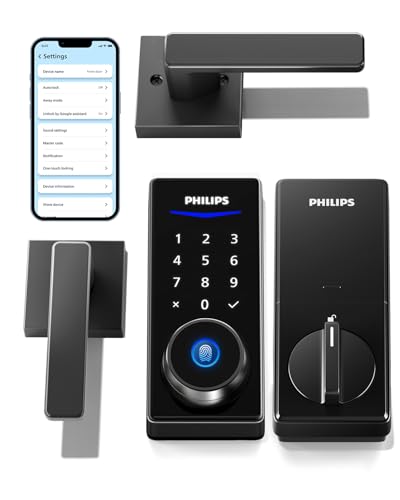
Philips Smart Lock With Handles arrives as a two‑handle set that upgrades entryway hardware while introducing smart access. The lock supports multiple unlock methods—fingerprint, PIN code, keys, and a mobile app—allowing households to pick the most convenient option for daily use and for guests. This combination of biometric and traditional methods provides a layered approach to security.
The lock includes built‑in Bluetooth for nearby control and can be extended to full remote operation via a Philips gateway (sold separately). Permissions can be shared, unlocking activity monitored, and user access managed from a central app, which is especially useful for families, shared residences, or small offices. The two‑handle design also aligns with contemporary door aesthetics and ergonomic needs for frequent entry.
Philips Wi‑Fi Deadbolt With Handle

The Philips Wi‑Fi Deadbolt Lock With Handle combines a modern deadbolt with a handle set and built‑in Wi‑Fi for hub‑free smart entry. Unlock methods include fingerprint, app control, passcode, mechanical key, and voice commands via Alexa or Google Assistant, delivering a flexible, multi‑layered approach to access control. The forward‑looking 5‑in‑1 entry design is ideal for households seeking seamless integration with their smart ecosystems.
Built‑in Wi‑Fi means no extra hub is required for remote access, while the Philips Home Access app provides real‑time status updates, permission sharing, and access management. Fingerprint unlocking is designed for speed, and the system supports a sizable number of enrolled fingerprints, which makes it well suited for busy households, multi‑tenant rentals, or small offices. The door hardware pairs with the lock to deliver a cohesive, durable entrance solution.
Buying Guide
Choosing the right smart front door lock with a handle involves balancing access needs, connectivity, installation practicality, and security. Below are key considerations to help compare the options in this guide and others you may be considering.
- Access methods: Determine how you want to unlock your door. Options typically include app control, fingerprint, PIN codes, mechanical keys, fobs, and voice commands. A multi‑method lock offers flexibility for family members, guests, and service personnel.
- Connectivity and ecosystem: Decide whether you prefer Bluetooth (local only), Wi‑Fi (remote access), or a hybrid approach with a gateway. Consider whether you need voice assistant integration (Alexa/Google) and whether your smart home already uses a particular app or platform.
- Gateway and setup: Some devices require a gateway for full remote features. If you want complete remote management and access sharing, verify gateway availability, compatibility, and any ongoing subscription requirements.
- Security features: Look for anti‑peep keypad options, strong encryption (AES 128‑bit or similar), tamper alerts, and robust fingerprint recognition accuracy. A broad code database and one‑time or time‑bound codes can reduce risk when guests are present.
- Power and maintenance: Check battery type (AA or other), expected life, and replacement ease. Consider routines like auto‑lock timing and low‑battery notifications to avoid being locked out unexpectedly.
- User management: For households with multiple residents or rentals, assess how many distinct user profiles or codes you can create, how easy it is to revoke access, and whether you can view access logs for auditing purposes.
- Installation and fit: Confirm compatibility with your door type (interior vs exterior), handle orientation, and whether the lock can retrofit your existing hardware without specialized hardware.
- Weather resilience: If the device will be used on an exterior door, check IP ratings or weatherproofing details to ensure reliability in your climate.
- Cost vs. value: While prices vary, prioritize features that deliver long‑term value, such as durable build quality, reliable biometrics, and the practicality of shared access options for rentals or shared dwellings.
Quick Comparison Snapshot
| Product | Access Methods | Connectivity | Gateway | Notes |
|---|---|---|---|---|
| Veise VE06-H | App, Code, Fobs, Mechanical Key, Thumb Turn | App Control | Optional | Strong multi‑user support |
| Philips Wi‑Fi With Handle | App, Fingerprint, PIN, Keys, Voice | Wi‑Fi | Included/Optional | Remote control; gateway needed for full remote use |
| SMONET Front Door Lock | Anti‑peep keypad, Keys, Fobs, App Bluetooth, Fingerprint | Bluetooth | Optional | Fast fingerprint unlock; Alexa/Google support |
| Philips Smart Lock With Handles | Fingerprint, PIN, Keys, App | Bluetooth | Optional | Two‑handle aesthetic; remote via gateway |
| Philips Wi‑Fi Deadbolt With Handle | Fingerprint, App, Passcode, Key, Voice | Wi‑Fi | No hub required | 5‑in‑1 entry; up to 20 fingerprints |